Listening
Local-first dictation
Talk messy. Paste clean.
Waffle turns rambling dictation, filler words, and spoken corrections into polished text you can use in emails, docs, tickets, and notes.
Windows 10/11 · 64-bit · Free to try · No card required
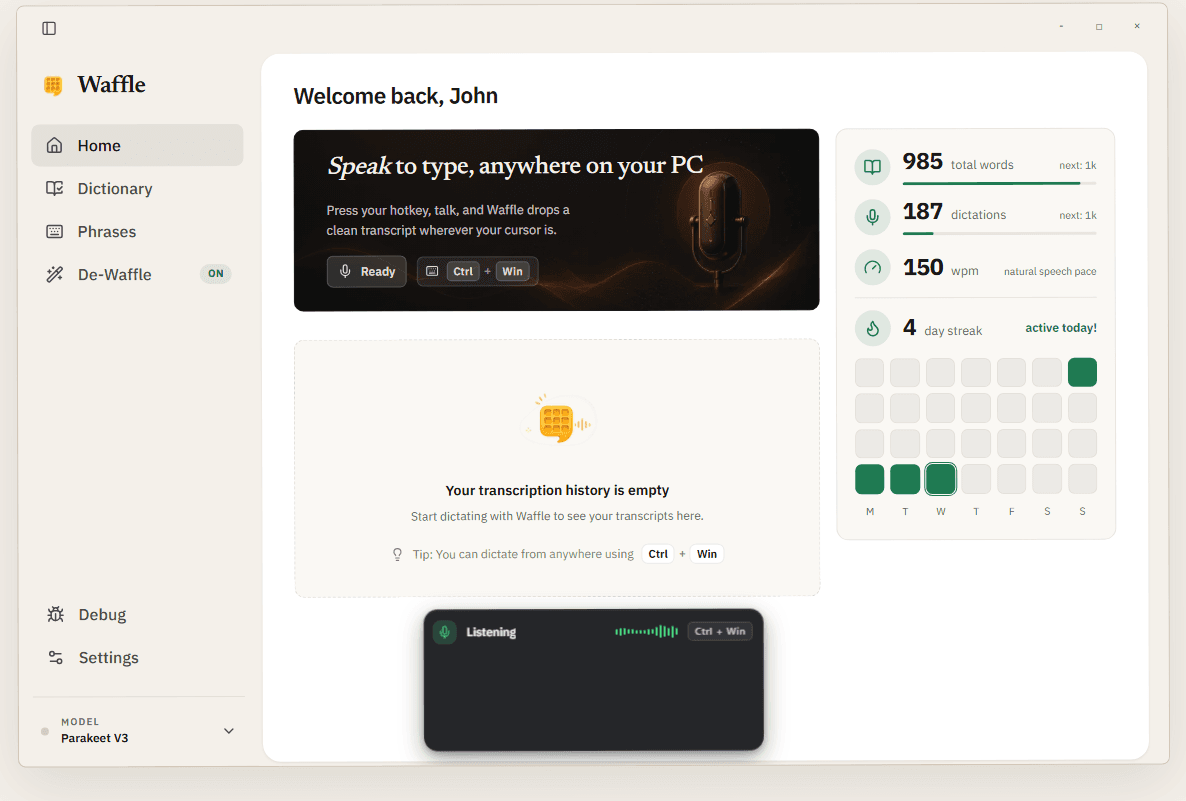
-□×
Welcome back, John

Speak to type, anywhere on your PC
Press your hotkey, talk, and Waffle drops a clean transcript wherever your cursor is.
ReadyCtrlWin
Your transcription history is empty
Start dictating with Waffle to see your transcripts here.
Tip: You can dictate from anywhere usingCtrlWin
Free Windows app
Local by default
No credit card
Works where you type
Why It Feels Faster
Capture thoughts nearly 4x faster than typing.
Most people type around 40 words per minute. Natural speech is around 150. Waffle helps you capture thoughts at the speed you speak, nearly 4x faster than typing.
Typing
40 WPM
Average person
Speech
150 WPM
Natural pace
Difference
3.75x
Speaking vs typing
These are conservative benchmarks. Fast typists can go higher, but for most people, speaking still gets the first draft out far faster.
Average words per minute
Nearly 4x fasterTyping
Average typing
Speaking
Natural speech
Waffle
Capture thoughts at speaking speed
150 ÷ 40 = 3.75. Waffle helps you keep up with the pace you already think and speak.
The Waffle difference
The problem with dictation is the cleanup.
Built-in dictation is literal. It captures the pause, the filler, the wrong date, and the correction. Waffle listens for the final intent so you spend less time fixing the transcript afterward.
Removesfalse starts
Keepsfinal intent
De-Waffle cleanup preview
Local intent pass
Raw capture
01“book it for 3pm... no 4... actually tomorrow at 4”
Waffle wrote
Book it for tomorrow at 4pm.
Raw capture
02“tell Sarah I'll send it Monday, wait, Tuesday morning”
Waffle wrote
Tell Sarah I'll send it Tuesday morning.
Dictate the work that slows you down
Use Waffle for the repeated writing that steals minutes all day: replies, notes, follow-ups, tickets, records, and drafts.
Email replies
Clinical notes
Support tickets
Meeting follow-ups
CRM updates
Long-form drafts
Time entries
Research notes
De-Waffle
Remove filler, false starts, and duplicated phrases before the text lands in your app.
Smart Corrections
Handle spoken pivots like “no, make that Friday” without manually editing the result.
Polish (Pro+)
Turn rough notes into shorter, clearer, more professional writing when a message needs extra care.
Waffy Companion
See when Waffle is listening, processing, or ready without opening the full app window.
Waffy + speech bubbles
A tiny desktop companion that tells you what Waffle is doing.
Waffy lives with the app as a friendly status surface: listening when you talk, thinking while Waffle cleans up the transcript, and celebrating when your text is ready.
Readable
Short speech bubbles
Movable
Drag to a quiet spot
Optional
Hide it anytime
Waffy status window
Desktop companionI'm listeningWriting that upPasted it in
Ready when you are
Local-first design
Your data stays with you.
No audio stored
Privacy by default.
Cloud only when enabled
You're in control.
Built for privacy-conscious users
No tracking required.
App features
Features that turn speech into usable text.
Dictionary, Phrases, and De-Waffle are not settings screens for their own sake. They are the features that teach Waffle your vocabulary, expand reusable text, and clean up rambling speech.
Vocabulary memory
Dictionary
Teach Waffle the words it should never guess at: names, project terms, acronyms, medication names, client spellings, and custom corrections.
1
Add the term exactly how it should appear in final text.
2
Give Waffle spoken variants, aliases, or common mis-hearings.
3
Future dictations use that vocabulary during cleanup and insertion.
Result: Great for people, products, specialist terms, and anything regular dictation keeps getting wrong.
Dictionary
Words Waffle learned
Zylar
Mirella Chen
AcmeQL
Parakeet V3
“Mention Zylar and send the notes to Mirella Chen.”
Reusable voice shortcuts
Phrases
Turn short spoken triggers into longer blocks of text you use all the time, without making your clipboard or notes app do the work.
1
Create a phrase trigger in the app.
2
Say it while dictating, then let Waffle expand it into the saved text.
3
Use it for sign-offs, ticket replies, templates, and repeated instructions.
Result: Best for repeatable text that should sound consistent every time.
User says: “insert follow-up email”
Hi Sarah,Thanks for your time today. I’ll send the notes over shortly and follow up with next steps.Best,Joshua
Inserted into active text box
Cleanup rules
De-Waffle
De-Waffle is the cleanup layer that turns rambling speech into the sentence you meant to send, while letting you choose how much polish to apply.
1
Removes filler, repeated words, false starts, and spoken corrections.
2
Normalizes things like dates, times, punctuation, and formatting.
3
Runs locally first, with optional cloud polish for heavier rewrites.
Result: Use it when you want natural speech to land as clean, cursor-ready text.
Before
“book it for 3pm... no 4... actually tomorrow at 4 and make it sound normal”
After
Book it for tomorrow at 4pm.


Works where you type
Dictate into the apps you already use.
Waffle inserts clean text at your cursor, so the same hotkey works across email, notes, docs, chat, issue trackers, editors, and AI coding agents.
Press your hotkey, speak naturally, and Waffle drops the cleaned result into the active field.
Workflow Fit
A dictation layer that respects how you already work.
The best voice tool should disappear into your current apps. Waffle focuses on correction, privacy, and cursor-ready insertion instead of forcing you into a new workspace.
No new editor to learn
No copy-paste cleanup loop
No cloud dependency for everyday dictation
One hotkey, every active field
01
Capture
Speak naturally from any app.
02
Clean
Waffle removes stumbles and keeps the final intent.
03
Insert
The result lands where your cursor already is.
Private by default
Everyday dictation runs locally first, so private notes do not need to leave your machine.
Built for corrections
Say the correction out loud. Waffle keeps the final meaning instead of dumping every stumble into your text field.
Works where you type
Use one capture-clean-insert flow in email, docs, chat, issue trackers, and internal tools.
No workflow lock-in
Keep the local setup forever. Turn on cloud polish only when a higher-quality rewrite is worth it.
The Process
How Waffle simplifies your flow
Keep talking like a person. Waffle handles the cleanup, correction, and insertion in one pass.
01
Raw speech
Speak naturally
Just say what's on your mind. Stutters, pivots, and corrections are allowed.
“uh tell Sarah I'll send it Monday, wait, Tuesday morning”
02
Intent pass
Waffle cleans it up
Waffle removes the waffle, keeps the last correction, and normalizes the sentence.
Tuesday morning wins. Filler and false start removed.
03
Final text
Insert anywhere
The polished result lands in the active field, ready to send or keep writing.
Tell Sarah I'll send it Tuesday morning.
One hotkey starts the whole flow. No separate editor, no cleanup pass, no copy-paste detour.
Simple Pricing
Buy the local app once. Add cloud polish only when you need it.
Start
Free trial workflow
Own
£39 founder price, usually £59
Boost
£10/mo Pro+
Recommended
Local Pro
No subscription. Yours forever.
The full local dictation workflow for people who use Waffle every day: unlimited capture, smarter cleanup, personal vocabulary, and offline reliability.
Founder price
Save £20£39£59
One-time payment before Local Pro moves to full price.
Includes all future Local Pro features.
Unlimited local dictation
Unlimited history
Unlimited phrases
Unlimited dictionary
Full De-Waffle cleanup
Use your own AI key, your way
Smart corrections for times and names
Personal dictionary + learning
Works fully offline
Use on up to 3 devices
All future Local Pro features included
Free
Try the habit first.
£0
forever
- Core dictation
- 25 history entries
- 5 phrases
- 25 dictionary entries
- BYOK test mode

Pro+
Let Waffle handle everything.
£10
per month
- Local Pro features while subscribed
- Managed cloud transcription
- Managed cloud polish
- Rewrite, refine, summarise
| Compare plans | Free | Local Pro | Pro+ |
|---|---|---|---|
| Core dictation | |||
| History | 25 entries | Unlimited | Unlimited |
| Phrases | 5 | Unlimited | Unlimited |
| Dictionary | 25 entries | Unlimited | Unlimited |
| Offline mode | |||
| De-Waffle (basic) | |||
| De-Waffle (advanced) | |||
| Bring your own AI key | Test mode | Unlimited | Included |
| Vocabulary learning | |||
| Time normalization | |||
| Cloud processing | |||
| Polish / Transform | |||
| Best accuracy |
Already subscribed?
Manage billing, invoices, payment details, or cancellation through Stripe.
FAQ
Common Questions
The practical details about privacy, offline use, and what makes Waffle different from built-in dictation.
Still have questions? Download the free Windows version and see how it fits.
Try the dictation workflow that cleans itself.
Download Waffle for Windows, test local dictation for free, and upgrade only when cleaner speech-to-text becomes part of your day.
Download for Windows
Windows 10/11 · 64-bit · Free to try · No card required